What you do — how we work it out
What it is
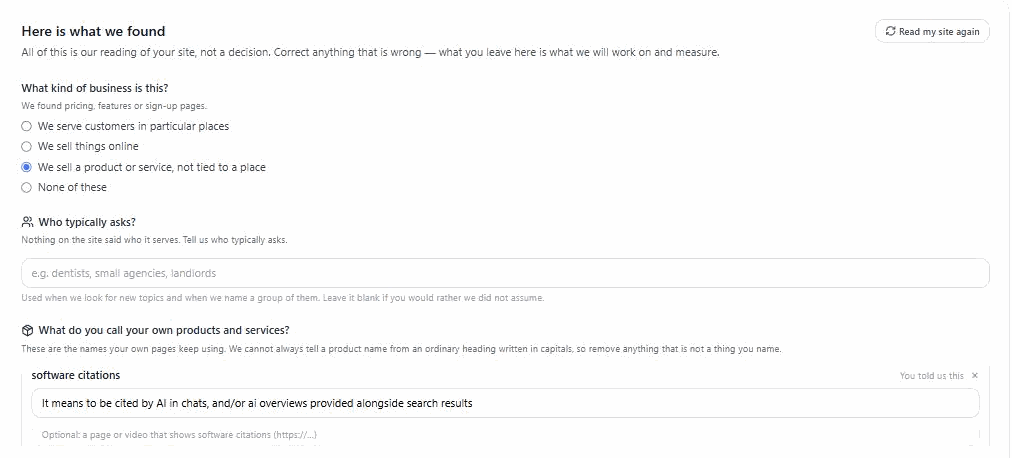
Open a project and you will see "What you do". We read your website and propose three things: what kind of business this looks like, the places you serve, and the topics you cover. None of it is a decision. It is our reading of your site, for you to correct.
Why we do it this way
Setting up used to ask you to type keywords on your first day. That is an expert decision, asked before you had seen anything the product does — and if you guessed wrong, everything afterwards was aimed at the wrong subject, quietly. Reading your site first means the starting point comes from your own pages rather than from a blank box.
How to check our work
Hover any topic and it names the page we found it on. If a topic came from a page that is not really your business — a template page, an old service you dropped — remove it. If we missed something, add it. What you leave is what we work on and measure. Nothing is saved until you press confirm, so leaving the screen half-done changes nothing.
When we cannot tell
Some sites we cannot read: a site that builds itself in the browser may serve us almost no words, and some hosts block us. When that happens we say so and ask you directly, rather than assembling a plausible-looking list from your domain name. An empty answer and a wrong answer look the same on screen, and only one of them is honest. The same applies to the kind of business. If nothing on the site told us clearly, we say "please tell us" rather than picking the nearest option.
Places and divisions are not the same thing
A place is somewhere people search — "Manchester". A division is a part of your business — "Commercial", "Insurance work". We keep them apart deliberately. A division folded into a location search becomes "best plumber in Commercial", which nobody types — and we would then track that phrase, report a position for it, and spend a search credit on it every night. So divisions are never used as places. If you serve several places, the first is your project's main location and the rest are branches — several branches in one pass is part of the Agency and Enterprise plans.
Two choices that spend your own AI key
Before you can confirm, the step asks you about two optional readings, each with Turn on or Pass. They are optional readings that spend your own AI key beyond the measurement and writing you have already chosen, so we ask rather than decide for you. Before-readings for new gaps — when the scan finds a gap, one small visibility check on that subject before anything is published for it, so a later reading can show a real before and after, each with its sample. The check is the subject's two standard questions asked of the engines your watchlist measures: up to 6 calls with 3 engines, at most 5 readings per project a day. Passage check after writing — before a page for your own site is published, your cheapest engine reads each section on its own and says whether it stands alone. One call per section, at most 12 a page. A section that does not is flagged in the gap's notes, not rewritten, and publishing is never held up. Pass means off. Both are account settings, so the answer covers every project, and you can change either later in Settings, where the calls are stated beside the switch. Accounts set up before 27 September 2026 have both off, and their existing projects are not sent back through setup; the next project you set up will ask. Where the account has no AI key of its own, neither runs and nothing is spent.
Then we measure
Once you confirm, we can measure where you stand — against the topics you agreed to, not our guess at them. The number of questions comes from how many topics you confirmed, two per topic, and we show it before spending anything on your AI key. Below 20 questions we call the result a first look rather than a measurement, and tell you how many more topics would make it a baseline you can track against. That is not modesty: a small sample carries a confidence range wide enough that a rise and a fall look identical, and reporting it as a position would be telling you something we do not know.
Come back to this screen whenever your business changes. The topic list is meant to evolve — you can also manage it in full on the project page.