Shopify, Wix, Ghost & webhooks
What It Does
The Evidence Engine writes pages that have to live on your own site, and this is where you say where they go. Beyond WordPress there are four kinds of destination: a Shopify store's blog, a Wix blog, a Ghost blog, or a webhook — anything that can receive a post, which covers headless CMSs, Zapier and Make, and anything custom.
Connecting a Shopify store
1. In your Shopify admin, create a custom app for your store and give it two Admin API scopes: read_content and write_content. Install it and copy its Admin API access token. 2. Open Connections → Publishing → Add destination, and choose Shopify. 3. Paste the token and your store's myshopify.com address — for example your-store.myshopify.com. A custom domain is not accepted here; we read your store's primary domain from Shopify and use it to match the store to your project. 4. Press Load blogs and pick the blog pages should go to. Pages go out as articles on that blog, credited to your business — never to a person we made up — with the same machine-readable provenance inside the article as on any page for your own site. Articles are published live, as on Ghost and Wix; turn on Review before publishing if you want to approve each one first. When a page is published again or rewritten, the same article is updated in place rather than copied. An article of your own that happens to have the same handle is never overwritten. If Shopify asks us to slow down, we wait and try again; a post queued on the Drip Schedule that still finds the store busy is tried again later on the same schedule as a webhook post. Tags are not sent yet. Your token is stored encrypted and is never shown back in the browser.
Connecting a Wix site
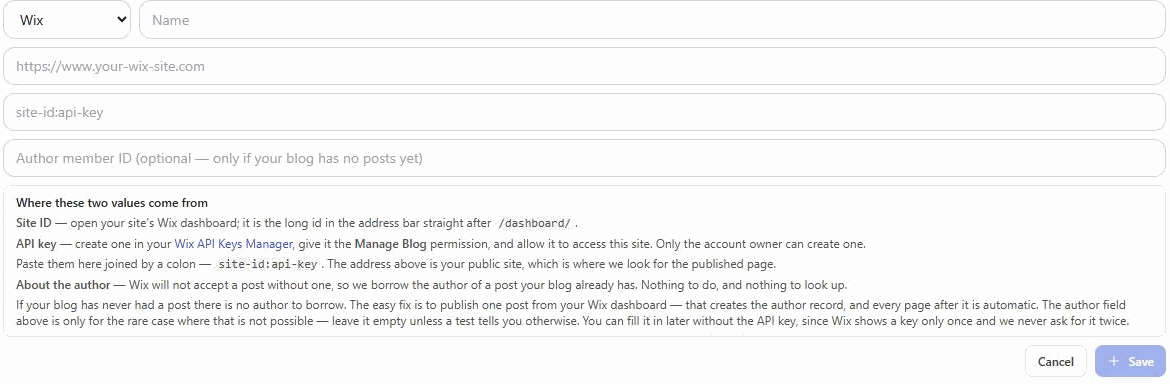
1. Open Connections → Publishing → Add destination, and choose Wix. 2. Address: your public site address, which is where we look for the published page. 3. Credential: your site ID and an API key, joined by a colon — site-id:api-key. • The site ID is the long id in your Wix dashboard address, straight after /dashboard/. • The API key comes from your Wix API Keys Manager, with the Manage Blog permission and access to this site. Only the account owner can create one. 4. Press Test. It publishes a short post you can delete, and hands back its address.
About the author
Wix will not store a post without an author, and an API key is not itself a site member — so we take the author from a post your blog already has. There is nothing to set up and no ID to look up. The one exception is a blog that has never had a single post: publish one from your Wix dashboard and every page after it is automatic.
Connecting Ghost or a webhook
Ghost — the address is your blog's base URL, and the credential is your Ghost Admin API key in its id:secret form. Webhook — the address is the endpoint we POST to, and the secret is optional. We send { type, title, html, excerpt, imageUrl, videoUrl, externalId, publishedAt, source } as JSON, signed the Standard Webhooks way: webhook-id, webhook-timestamp and webhook-signature headers, the signature an HMAC-SHA256 made with your secret, so your endpoint can check who sent it and refuse a replay. For now your secret is also sent in the Authorization: Bearer and X-Webhook-Secret headers. externalId is our id for the post - store it, and if the same one arrives again, answer with the post you already have instead of creating a copy. Your endpoint must reply with the address of the page it created — {"url":"https://..."}. Without one we cannot submit the page for indexing, re-measure it, or show you what was built, so we record it as not published rather than claiming a page that might not exist. If a post queued on the Drip Schedule meets a timeout, cannot reach your endpoint, or is answered 408, 429 or a 5xx, we try again — five attempts in all, over about two and a half hours — and the Drip Schedule shows which attempt it is on and when the next one is due. Any other 4xx is taken as your site's answer and not sent again. Ghost and Wix are not retried this way. The full format, with code to check the signature, is in Webhook format — for your developer. Give that page to whoever writes your receiver.
Where your pages are filed
Since 29 September 2026 a page we publish is filed where your site keeps that kind of page, under a category or tag your site ALREADY has - we never create one, because a new category is a visible change to your site that is yours to make. • WordPress: the post goes under an existing category - one named for the kind of page (Comparisons, Glossary, Guides, Case studies, Research), otherwise the one named for the subject's parent topic, otherwise the subject. "Uncategorized" is never chosen. With no match the post goes where WordPress puts posts by default. • Ghost: the same rule picks an existing tag, sent as the post's primary tag (the one Ghost themes use for the section). No match, no tag. • Wix: an existing blog category, by its id. • Shopify: the blog you chose on the connection. Tags are not sent yet. • A webhook: two hints your receiver may use or ignore - section ("guides", "compare", "glossary" or "use-cases") and category (the subject's parent topic). Where each page went - or that it was not filed, and why - is kept with the page, and your AI assistant can read it through get_published_evidence.
Choosing where a project publishes
A project publishes to the destination you choose in its settings, and a campaign can override it. Left alone, we publish only to a connection on that project's own domain — never to whichever connection happens to be first on the account, because that is how one business's pages end up on another's blog. If nothing matches, pages are handed back as finished drafts rather than being sent somewhere they do not belong. There is also an explicit Off, if a campaign should never publish to your site at all.
Every destination row has Manage as well as Test, so a credential can be corrected in place. Leave the credential field blank to keep the one already stored — useful for Wix, which shows an API key only once.