Visibility Audit
What It Does
The Visibility Audit tests whether your brand is named and cited across 3 of 6 AI engines per run, chosen from ChatGPT, Gemini, Perplexity, Claude, Grok and DeepSeek. It also audits robots.txt, llms.txt, schema readiness, and crawlability - returning a scored grade.
Running a Check
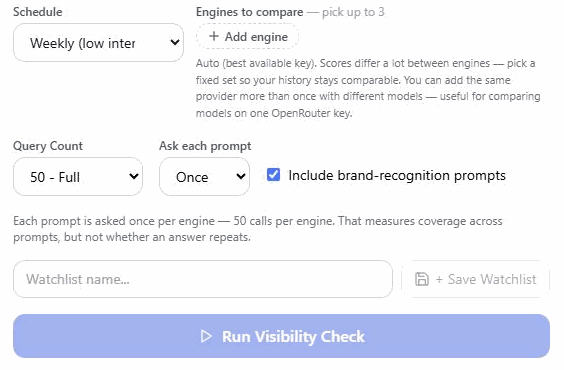
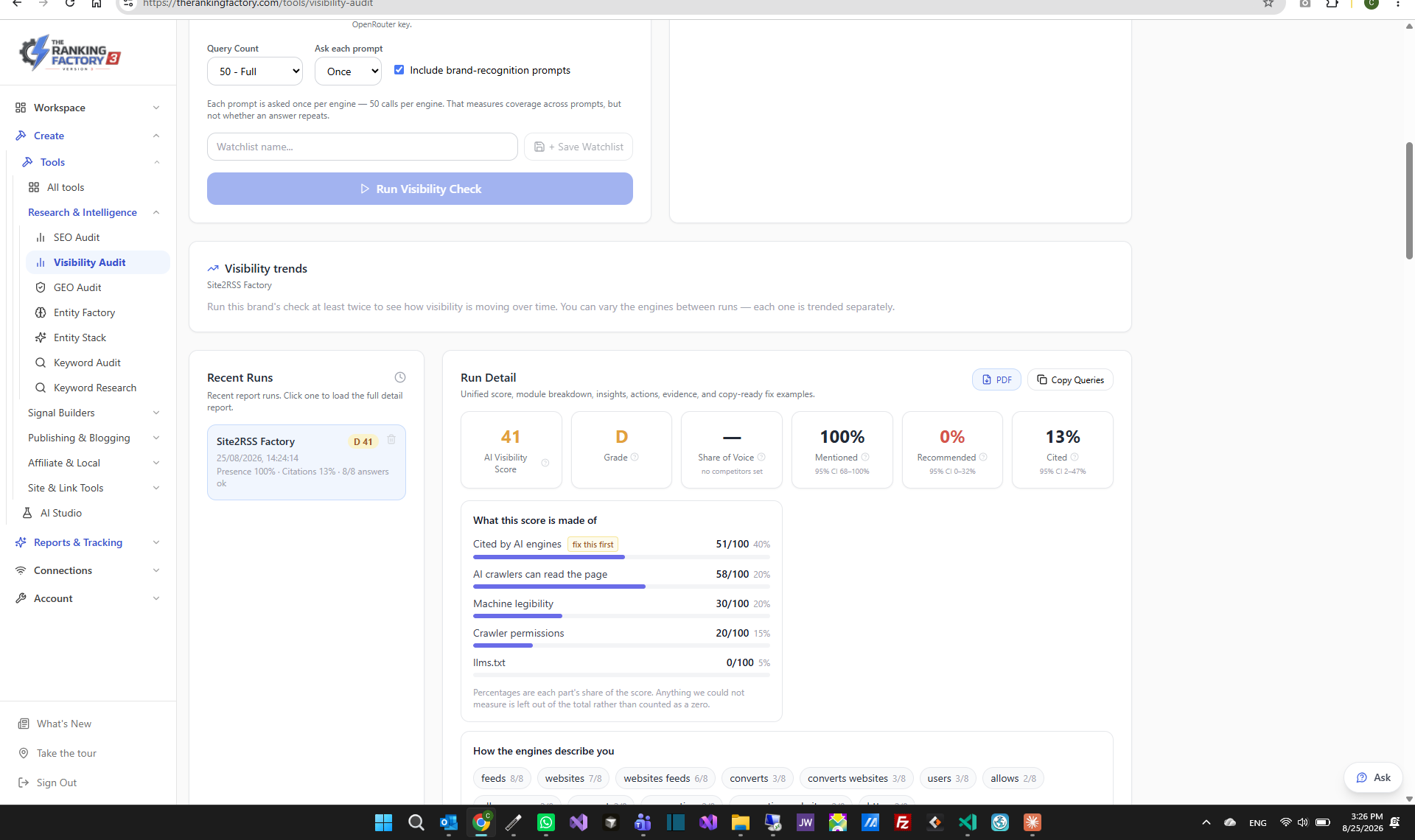
1. Open Tools → Visibility Audit. 2. Enter your brand name and website URL. 3. Click Check - each prompt goes to every engine you picked, and you get three rates back with their 95% ranges: named, recommended, cited.
Improving Your Score
- Low entity score → run Entity Stack - Missing llms.txt → create one (the tool provides a template) - Poor schema → add Organisation schema from Entity Stack output - No AI citations → hand the topic to the Evidence Engine, which finds what is missing, builds it, publishes it, and re-measures on a later run
How we measure it (and what the numbers mean)
AI answers are not deterministic. Ask the same question twice and you can get different businesses named — that is a property of the engines, not a fault in the measurement. Everything below exists so the numbers stay honest about that. EVERY PROMPT IS ASKED OF EVERY ENGINE. Your prompt set is put to each engine you have configured, so per-engine results are directly comparable — same questions, same run. A blended score would hide that you can be strong in one engine and invisible in another. THE 95% RANGE, NOT JUST THE PERCENTAGE. Each rate is shown with a confidence range and the number of prompts behind it. "Named in 60%" from 10 prompts and from 100 prompts are not the same claim, and the range is what tells them apart. A wider range means fewer samples, not a worse result. ASK EACH PROMPT MORE THAN ONCE (optional). On the run form you can ask each prompt once, 3 times, or 5 times. This measures something the confidence range does not: • COVERAGE — how sure we are of a rate across your prompt set. That is what the range shows. • STABILITY — whether one prompt gives the same answer when asked again. They answer different questions and are reported separately. A run that asked once shows no stability figure at all, because nothing about repeatability was measured — we would rather show nothing than a reassuring "100%". Repeats multiply the API calls on your own key, so the cost is stated on the form and it is never raised for you automatically. Scheduled runs stay at one ask per prompt for the same reason. WHERE THE ANSWER CHANGED. When you use repeats, the report lists the exact prompts whose answers disagreed between attempts, with counts rather than percentages. Those are usually the most useful lines in the report: they are the questions where the engine has not made its mind up about you. LOOKED AT, NOT CITED. Asked directly on your own OpenAI or Anthropic key (not through OpenRouter), OpenAI and Claude say which pages their web search returned for an answer, as well as which ones the answer cited. Under each answer of a run we list the sites that were returned and not cited, and above the answers we count how many of them passed over a page of your own, out of the answers whose engine said what its search returned - an answer that cited every page it was shown counts too. That is a different problem from not being found: the search reached your page and the answer chose other sources, so the work is on what the page says rather than on getting it crawled. It shows the search returned the page, not that the model read it. Gemini and Perplexity do not separate the two, so their answers are not in that count, and a run made before 2 October 2026 has no such list. WHOSE SOURCES THE ANSWERS USED. Each site the answers cited is counted as your own site, published for you, or independent. A page we published for you counts as published for you wherever it sits - a video on your YouTube channel, a page on cloud storage, a post on another site - because we find its address in our own record of what we published for your account, and a video by its YouTube id however the link was written. Someone else's page on the same site, such as a customer's review on YouTube, still counts as independent. The same record marks a page as ours under Sites AI cites and keeps it off the outreach list. Two things it cannot settle: a video or a page made with the one-off YouTube Video or Cloud Stacker tools before 7 October 2026 was never recorded, so it is judged by its site; and a Gemini citation that never resolved to an address (every Gemini citation before 11 September 2026) names only its site, so on a site where we have published for you it is counted as one we could not trace - it could be ours or somebody else's - never as independent. Only independent sources make a sentiment reading say anything about your reputation; when a run has none, it says so. The split is worked out each time you open a run, so earlier runs are shown the same way. WHY YOUR HISTORY DOES NOT ALWAYS JOIN UP. Every run records which engines it measured. Runs on different engine sets are deliberately not plotted on one line — changing engines is a change of method, not a change in your visibility. Adding an engine starts a fresh trend line and your existing history stays under the old set. Runs that stopped early (a provider out of credits, for example) are excluded from trends rather than scored, because a partial sample is skewed towards whichever engines did answer. A run also asks about as many of your topics as its prompt count allows: the ones we have just published for are re-checked first, then the ones asked about longest ago. So two runs on the same engines can measure different topics. That is a change of question rather than of visibility, and it does not break the line — which is why it is worth knowing about when a number moves.
What makes up the score
The visibility score is a composite. 40% is the answer score: of the run's answers, how many named you (35 points), cited your site (25), spoke of you positively (10), named you when the question left your name out (20), and how early your name came (10). 60% is your site: whether AI crawlers can read the page (20), machine legibility (20), robots.txt (15) and llms.txt (5). It moves when the questions change as well as when you do: a run that happens to ask more questions without your name scores lower with nothing about you changed, and so does a model update or an engine that fails to answer. "How we measure" works one through with a made-up business, Harbour Plumbing, step by step. The score shown for a run is the one it had on the day. When you open an old run, the site checks below it are read again today, and the page says so. FIXED SOMETHING? RE-SCORE WITHOUT A NEW RUN. When a run points at something on your site — no llms.txt, a robots.txt that leaves AI crawlers out, no structured data on the page — you do not need a new run to see the fix counted. On your latest run, press "Re-read my site and re-score". We read the site again and work the score out again with that run's own answers. No AI is asked, so nothing is spent on your keys, and only the site's 60% of the score can move - except on a run scored before 7 October 2026. Its answers are then counted by the rule we have used since that day for a question that leaves your name out, so the answers' 40% can move too, and the run says so before you press the button and again after. The run then says when it was re-scored and what it scored on the day it was made. Only the latest run of a site can be re-scored: an earlier run is a point in your history and keeps the score of its day. If we cannot read your site at that moment — a firewall, a timeout — the score is left exactly as it was and the page says why.
Tracked prompts
The score is a composite of many questions and your site, so it cannot tell you what happened to one question. A tracked prompt can: the exact question you care about, asked on your visibility engines on the schedule you choose - daily, weekly or monthly, weekly by default - with every answer kept. Each answer shows whether you were named and where, whether your site was cited, and what the answer cited. Add one on the AI Visibility page under Tracked prompts, or press Track question on a topic's row on the project page: that tracks the question a visibility run asks for the topic without your name. A project keeps up to 20. Each is asked on your own AI keys, and the page says about how many answers a month a prompt costs before you add it. Tracked answers are not part of the visibility score. Search every answer on the same card finds a topic or a phrase across your visibility runs and your tracked prompts together, saying which each answer came from. If no engine answers a prompt, it is tried again within six hours. A page we published for you that one of your engines' answers to a tracked prompt cites is counted as cited, exactly as when a visibility run's answer cites it. If the page has no citation on record yet, the answer's day and the engine that gave it are recorded. A date already on record is not moved by an older answer read later: a tracked answer given on or before 7 October does not change the date a visibility run had already recorded for the same page. It shows in What's working, on your project page and to your AI agent, and, like any page an AI engine has cited, it is not rewritten without your approval. The ChatGPT and Gemini apps' answers are not counted there. Your tracked prompts can also be asked of the ChatGPT app and the Gemini app themselves, through DataForSEO on your own DataForSEO account, from the location you set for the project. Each app has a line of its own and is never added to your engines' figures or your score. "Asking the ChatGPT and Gemini apps" explains what to set up first, what each line says and what it costs.